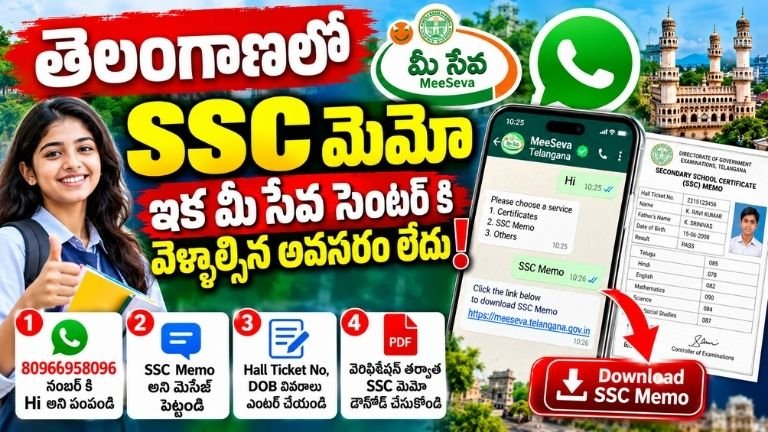
Telangana SSC Memo Download Through WhatsApp: Get Your SSC Memo Online Without Visiting MeeSeva
Students and citizens in Telangana can now access essential certificate-related services more conveniently through WhatsApp. One of the useful services available through the Telangana MeeSeva system is the option to request SSC Memo-related information and download a copy digitally.
Earlier, students who needed their SSC memo often had to visit a MeeSeva centre or depend on other offline procedures. With the availability of WhatsApp-based services, the process can be completed more conveniently using a mobile phone.
This service can be especially useful for students who need their SSC memo for education, employment, document verification, applications, or other official purposes.
What Is the Telangana SSC Memo WhatsApp Service?
The SSC memo is an important educational document issued after completing the Secondary School Certificate examination. It contains important academic details of the student and is commonly required for various educational and employment-related purposes.
Through the WhatsApp-based MeeSeva service, users can initiate the process from their mobile phone instead of immediately visiting a MeeSeva centre.
The basic process involves sending a message to the designated MeeSeva WhatsApp number, selecting the relevant SSC Memo service, providing the required student details, completing verification, and accessing the available document or service result.
Telangana MeeSeva WhatsApp Number
According to the information provided, users can initiate the service by sending a WhatsApp message to the MeeSeva WhatsApp number:
80966958096
Users can save the number on their mobile phone and open WhatsApp. After opening the chat, they can send a simple greeting such as “Hi” to begin the service.
Once the WhatsApp service responds, users should follow the instructions displayed in the chat.
How to Download Telangana SSC Memo Through WhatsApp
The process is designed to be simple. However, users should carefully enter their personal and examination information because incorrect details may prevent verification.
Step 1: Save the MeeSeva WhatsApp Number
First, save the Telangana MeeSeva WhatsApp service number 80966958096 on your mobile phone.
After saving the number, open WhatsApp and search for the saved contact.
Step 2: Send “Hi”
Open the WhatsApp conversation and send:
Hi
The automated MeeSeva service should provide further instructions or a menu of available services.
Step 3: Select the SSC Memo Service
After the service starts, look for the option related to the SSC Memo or SSC examination document.
Select the appropriate option according to the instructions shown on WhatsApp.
The exact menu wording or options may change when the service is updated, so users should follow the options displayed in their WhatsApp conversation.
Step 4: Open the Link Provided
After selecting the SSC Memo service, the WhatsApp system may provide a link or redirect users to an official online page.
Open the link carefully and make sure that it belongs to the official Telangana government or MeeSeva service before entering personal information.
Step 5: Enter Your Examination Details
The service may ask for information required to identify and verify the student’s SSC record.
Depending on the service requirements, users may need details such as:
- SSC Hall Ticket Number
- Date of Birth or other identifying details
- Examination-related information
- Mobile number or verification information, if requested
Enter the details exactly as they appear in your official records.
Step 6: Complete Verification
After entering the required information, submit the details.
The system will verify the information against the available records. If the information matches, the student’s SSC Memo details should be displayed through the service.
If the information does not match, users should carefully check the details entered and try again according to the instructions provided by the official service.
Step 7: Access the SSC Memo
After successful verification, the available SSC Memo information can be displayed.
Depending on the service functionality, users may receive an option to view or download the document digitally.
The downloaded copy can then be saved on the mobile phone for future reference.
What Details Are Required?
Before starting the process, users should keep their educational information ready.
The most important detail is generally the student’s SSC Hall Ticket Number. Other information may also be requested to verify the student’s identity and examination record.
Users should avoid entering random or incorrect information because the verification process depends on matching the details with the official records.
It is also important to keep the mobile phone connected to the internet while using the WhatsApp service.
Why Is the WhatsApp SSC Memo Service Useful?
The biggest advantage of an online WhatsApp service is convenience.
Students and citizens who need their SSC memo may not have to immediately travel to a MeeSeva centre just to begin the process. Instead, they can start the service using their smartphone.
This can be particularly useful for people living in rural areas or those who have difficulty travelling to service centres.
Saves Time
Visiting a service centre can take time because users may have to travel, wait for their turn, submit information, and collect the requested document.
A digital WhatsApp-based process can reduce some of these steps.
Easy to Use
WhatsApp is already widely used by students and citizens. Therefore, beginning a government service through a familiar messaging platform can make the process easier for many users.
Convenient for Students
Students may need their SSC memo while applying for higher education, jobs, scholarships, competitive examinations, or other services.
Having access to a digital copy can make it easier to retrieve the document when required.
Useful for Digital Records
Once a digital copy is downloaded, users can store it on their smartphone, computer, cloud storage, or other secure location.
It is still advisable to keep original educational documents safely because a digital copy may not replace an original certificate in every situation.
Where Can the SSC Memo Be Used?
The SSC Memo is an important educational record and may be required for several purposes.
Common situations can include:
- College or higher education admissions
- Job applications
- Government recruitment applications
- Scholarship applications
- Educational document verification
- Competitive examinations
- Personal educational records
- Other official verification processes
The exact document requirements depend on the institution or authority requesting the certificate.
Therefore, before submitting a downloaded copy, users should check whether the concerned organization accepts a digital copy or requires an original/certified document.
Important Precautions While Using WhatsApp Services
Although digital government services are convenient, users should take precautions while sharing personal information online.
Use the Official Number
Always verify the WhatsApp number before starting the process.
According to the information provided for this service, the number is 80966958096.
Users should independently verify the number through official Telangana government or MeeSeva sources if they have any doubt, especially before submitting sensitive information.
Do Not Share OTPs With Others
If an OTP is generated during verification, it should only be entered into the official service interface.
Never share OTPs, passwords, PINs, or banking information with another person.
MeeSeva-related educational services should not require users to give their banking password, ATM PIN, or similar confidential banking credentials.
Check Links Carefully
If WhatsApp provides a link, users should check that they are being directed to the appropriate official government service.
Do not enter personal information on suspicious websites or links received from unknown numbers.
Avoid Fake WhatsApp Numbers
Government services are frequently imitated by fraudulent accounts and websites.
If someone contacts you separately claiming to provide an SSC Memo service and asks for money, passwords, OTPs, or unnecessary personal information, do not share those details without verifying the service.
What If the SSC Memo Details Are Not Found?
Sometimes a student’s details may not appear immediately.
There can be several reasons for this, including incorrect examination information, an incorrect hall ticket number, a mismatch in personal details, technical problems, or limitations in the online database.
If the information is not found, first check all the details entered.
Make sure that the hall ticket number and other required information are correct.
If the problem continues, users should contact the appropriate official education department or MeeSeva support channel rather than relying on unofficial agents.
Can You Get the Original SSC Certificate Through WhatsApp?
Users should understand the difference between accessing a digital copy and receiving an original physical certificate.
A WhatsApp service may allow users to access or download digital information or a document, but this does not automatically mean that a physical original certificate is being issued through WhatsApp.
If an institution specifically asks for an original SSC certificate, users should follow the instructions given by that institution or the concerned education authority.
Keep a Backup of Your Downloaded Memo
After successfully downloading the SSC Memo, users should save a backup.
For example, the document can be stored in:
- A secure folder on the smartphone
- A personal computer
- Secure cloud storage
- An external storage device
It is also useful to keep the original educational documents in a safe place.
Having both physical and digital records can make future applications easier.
Frequently Asked Questions
1. What is the Telangana SSC Memo WhatsApp number?
The number mentioned for the WhatsApp service is 80966958096. Users should verify the current official number through Telangana government or MeeSeva channels before sharing personal information.
2. What message should I send first?
Users can start the WhatsApp conversation by sending “Hi” and then following the automated instructions.
3. Do I need to visit a MeeSeva centre immediately?
For the WhatsApp-based process described above, users can start the service online through WhatsApp. However, if the online service cannot retrieve the record or if an institution requires a physical/original document, a different procedure may be necessary.
4. What information may be required?
The service may ask for the student’s SSC Hall Ticket Number and other verification details.
5. Can I save the SSC Memo on my phone?
If the service provides a download option, the document can be saved on the device for future use.
6. What should I do if my details are incorrect?
Check the information carefully and enter the correct details. If the problem continues, contact the appropriate official support channel.
7. Is the digital SSC Memo accepted everywhere?
Not necessarily. Acceptance depends on the organization or authority requesting the document. Always check the document requirements before submitting it.
ssc memo
The Telangana MeeSeva WhatsApp service can make access to government and certificate-related services more convenient for citizens. Students who need their SSC Memo can begin the process from their smartphone by contacting the designated WhatsApp service and following the instructions provided.
The general process involves saving the official WhatsApp number, sending “Hi,” selecting the SSC Memo service, opening the official link provided, entering the required examination details, completing verification, and accessing the available SSC Memo information or download option.
Students should always verify the official WhatsApp number and website before entering personal details. They should also avoid sharing OTPs, passwords, banking information, or other confidential details with third parties.
For students who frequently need their SSC educational records, having a secure digital copy can be convenient. However, original certificates should still be preserved safely, and users should follow the specific document requirements of colleges, employers, government departments, or other institutions.
As Telangana continues expanding digital access to citizen services, WhatsApp-based services can provide another convenient way for people to access essential documents without making unnecessary trips to service centres.