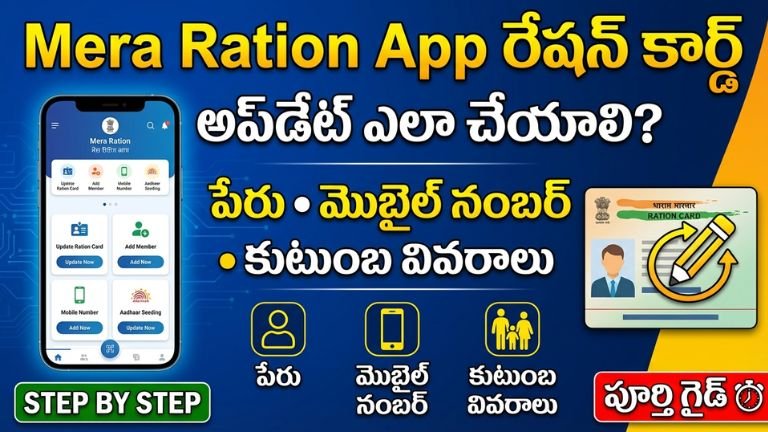
Mera Ration App – How to Update Ration Card Name, Mobile Number & Family Details | Complete Public Service Guide
In India, the ration card is not just a document—it is the backbone of food security for millions of families. Through the Public Distribution System (PDS), eligible households receive subsidized food grains and essential commodities. But what happens when your name is misspelled? Your mobile number changes? A new family member needs to be added? Or someone must be removed?
Earlier, citizens had to visit government offices repeatedly. Today, digital platforms like the Mera Ration App have made many services accessible from your mobile phone.
This detailed public service guide explains how to update:
- Name corrections
- Mobile number changes
- Family member additions or deletions
- eKYC status
- Ration card portability
- And related services
We will also explain how the system connects with the National Food Security Act (NFSA) and India’s One Nation One Ration Card framework.
Understanding the Public Distribution System (PDS)
The Public Distribution System is governed under the National Food Security Act (NFSA), 2013. It ensures subsidized grains like rice, wheat, and coarse cereals for eligible families.
Types of ration cards generally include:
- Priority Household (PHH)
- Antyodaya Anna Yojana (AAY)
- State-specific ration categories
The ration card also acts as an eligibility document for various government schemes.
What is Mera Ration App?
The Mera Ration App is a government-developed mobile application designed to support ration card holders, especially migrant workers.
Key Features:
- View ration card details
- Check entitlement
- Locate nearby Fair Price Shops
- Track transaction history
- Verify Aadhaar seeding
- Portability under One Nation One Ration Card
It simplifies access to ration-related information.
Why Updating Ration Card Details is Important
Incorrect details may lead to:
- Denial of food grains
- Aadhaar authentication failure
- Rejection in scheme eligibility
- Bank account linking issues
- Duplicate records
Keeping information updated ensures smooth benefits under PDS and other welfare schemes.
How to Update Name in Ration Card
Name corrections may be required due to:
- Spelling mistakes
- Marriage surname change
- Aadhaar mismatch
- Typographical errors
Step-by-Step Process (General Procedure)
- Open Mera Ration App.
- Check existing details under ration card profile.
- If correction option is not available in-app, visit your state PDS portal.
- Submit online correction request (if state supports it).
- Upload required documents (Aadhaar, affidavit, proof of correction).
- Track application status.
In some states, physical verification at Fair Price Shop (FPS) or MeeSeva center may be required.
How to Update Mobile Number in Ration Card
Mobile number linking is essential for:
- OTP verification
- eKYC
- SMS alerts
- Portability benefits
Process:
- Open Mera Ration App.
- Verify Aadhaar linkage status.
- If mobile update is not enabled in-app, visit local ration office or MeeSeva center.
- Submit Aadhaar copy and request form.
- Complete biometric authentication.
Updated number usually reflects within a few days.
Adding a New Family Member
Common reasons:
- Birth of child
- Marriage
- Dependent parent joining family
Required Documents:
- Aadhaar card
- Birth certificate (for newborn)
- Marriage certificate (if applicable)
- Existing ration card copy
Procedure:
- Apply through state PDS portal or MeeSeva.
- Upload documents.
- Biometric verification may be required.
- Approval by local food inspector.
Once approved, new member becomes eligible for food grain entitlement.
Removing a Family Member
Reasons:
- Death
- Marriage (daughter shifting)
- Migration
- Duplicate entry
Submit death certificate or relevant document and request deletion through official portal or service center.
One Nation One Ration Card (ONORC)
The ration card is portable across India under the ONORC initiative.
This allows migrant workers to collect ration from any state.
The Mera Ration App supports portability checks and shop locator features.
Role of MeeSeva and Public Service Centers
In many states, digital service centers such as MeeSeva assist with:
- Ration card updates
- Aadhaar seeding
- Document scanning
- Application submission
If mobile update is not possible through app, visiting a service center ensures faster resolution.
Documents Required for Any Ration Update
- Aadhaar card of head of family
- Aadhaar of concerned member
- Ration card copy
- Address proof
- Income certificate (if category change)
- Death or marriage certificate (if applicable)
Ensure documents are clear and updated.
Common Problems & Solutions
1. Aadhaar Not Linked
Visit ration office for biometric seeding.
2. Name Mismatch Between Aadhaar and Ration
Correct Aadhaar first, then update ration card.
3. Transaction Not Showing
Wait 24–48 hours for system sync.
4. OTP Not Receiving
Ensure Aadhaar mobile number is updated.
Benefits of Digital Ration Management
Digitalization offers:
- Transparency
- Reduced corruption
- Real-time tracking
- Direct benefit transfer integration
- Portability for migrant workers
This reduces dependency on middlemen.
Security & Fraud Prevention
Always:
- Use official app
- Avoid sharing OTP
- Do not pay private agents
- Verify through government portal
Fraudsters often promise quick updates for money.
State Variations
While Mera Ration App provides centralized features, actual update authority lies with state Food & Civil Supplies Departments.
Each state may:
- Allow full online update
- Require physical verification
- Offer hybrid model
Check your state’s official food department portal for exact rules.
Timeline for Updates
Typical processing times:
- Mobile update: 3–7 days
- Name correction: 7–15 days
- Family addition: 10–20 days
Delays may occur due to verification workload.
How Ration Card Impacts Other Schemes
Ration card data is often used for:
- LPG subsidy eligibility
- Scholarship verification
- Housing schemes
- State cash transfer programs
Correct details ensure uninterrupted benefits.
Frequently Asked Questions
Is Mera Ration App available for all states?
Yes, but services depend on state integration.
Can I update everything through the app?
Not always. Some changes require state portal or physical visit.
Is there any fee?
No official fee for correction. Service centers may charge nominal processing fee.
Can migrant workers update details from another state?
Basic portability features are available, but structural changes usually require home-state authority.
Best Practice Checklist
Before applying:
- Verify Aadhaar details
- Ensure bank account is active
- Keep scanned copies ready
- Check state website for latest instructions
Public Service Message
The ration system exists to protect vulnerable families. Digital tools like the Mera Ration App empower citizens to manage their information without unnecessary visits to offices.
Keeping your ration card updated ensures:
- Continuous food security
- Access to welfare schemes
- Seamless portability
- Reduced documentation problems
The Mera Ration App is a powerful digital public service tool that simplifies ration card management across India. However, full updates—such as name correction, mobile number change, or family addition—may require coordination with state authorities or MeeSeva centers.
Citizens should always rely on official platforms and avoid middlemen.
If you mention your specific state (Telangana, Andhra Pradesh, Karnataka, etc.), I can provide a state-specific step-by-step update guide tailored to that region.
Mera Ration App – Complete 360° Guide to Ration Card Name, Mobile & Family Updates in India
India’s Public Distribution System (PDS) supports more than 80 crore beneficiaries under the National Food Security Act (NFSA). With digital reforms and Aadhaar integration, ration services are now more transparent and portable.
One of the most important digital tools for ration beneficiaries is the Mera Ration App, developed to help citizens check and manage their ration details.
This extended public service article explains:
- How ration data is structured
- How updates actually happen in the backend system
- State-wise process variations
- Advanced troubleshooting
- Legal rights of beneficiaries
- Grievance redressal mechanism
- Portability and migrant benefits
- Step-by-step correction workflows
How Ration Card Data is Managed Digitally
Every ration card is linked to:
- Aadhaar numbers of family members
- State PDS database
- Fair Price Shop (FPS) allocation
- NFSA eligibility category
- Mobile number for OTP authentication
The Mera Ration App does not directly “edit” records. Instead, it displays data from the centralized database.
Actual updates are done by:
- State Food & Civil Supplies Department
- Taluk / Mandal Supply Office
- Authorized MeeSeva / CSC centers
What You Can Do Directly in Mera Ration App
Inside the app, you can:
✔ View ration card number
✔ Check head of family name
✔ View member list
✔ Check Aadhaar seeding status
✔ Track monthly transaction history
✔ Locate nearby Fair Price Shops
✔ Check portability eligibility
However, editing features depend on state integration.
Name Correction – Detailed Backend Process
If your name is incorrect:
Example issues:
- Spelling mismatch with Aadhaar
- Initial missing
- Marriage surname change
- Typographical error
Real Correction Flow
Step 1: Correct Aadhaar (if mismatch exists).
Step 2: Apply for ration correction through state portal or MeeSeva.
Step 3: Submit identity proof.
Step 4: Field-level verification (in some states).
Step 5: Data updated in state server.
Step 6: Sync reflected in Mera Ration App.
Processing Time: 7–20 working days.
Mobile Number Update – Why It Matters
Your registered mobile number is used for:
- OTP authentication
- Biometric failure fallback
- SMS transaction alerts
- Portability validation
If mobile number is not linked, you may face authentication issues at FPS.
Correct Way to Update Mobile
- Visit ration office or authorized center.
- Submit Aadhaar-linked mobile number.
- Complete biometric authentication.
- Wait for server sync (3–7 days).
In most states, mobile update is not fully editable inside the app.
Adding Family Member – Technical Verification
When adding a new member, authorities verify:
- Aadhaar uniqueness
- No duplication in another ration card
- Same household address
- NFSA eligibility
If Aadhaar is already linked elsewhere, request will be rejected.
For Newborn Child
- Birth certificate
- Aadhaar enrollment ID (if available)
- Parent’s ration card
Once approved, food entitlement increases.
Removing Member – Data De-duplication
Deletion is required when:
- Member expired
- Marriage migration
- Duplicate registration
Authorities perform database cross-check before removal.
Failure to remove migrated members can cause:
- Double benefit issues
- Future legal penalties
One Nation One Ration Card (ONORC)
Under ONORC reform, beneficiaries can collect ration anywhere in India.
The portability system works by:
- Aadhaar biometric authentication
- Central data pool
- Real-time stock deduction
Mera Ration App shows:
- Portability status
- Nearby FPS
- Last transaction location
This is especially helpful for migrant workers.
Legal Rights of Beneficiaries
Under the National Food Security Act:
- Eligible families have right to subsidized food grains.
- State must ensure supply without discrimination.
- Denial without valid reason can be challenged.
If FPS refuses ration despite valid card:
- File complaint through state helpline
- Report to district supply officer
Grievance Redressal System
If update is delayed or rejected:
- Visit local supply office.
- File written complaint.
- Use state PDS grievance portal.
- Contact toll-free number listed in state food department website.
Each state has designated grievance redressal officer.
Common Advanced Problems
Problem 1: Aadhaar Authentication Failure
Cause: Fingerprint mismatch
Solution: Update biometrics at Aadhaar center.
Problem 2: Duplicate Aadhaar Link
Cause: Linked to old ration card
Solution: Request deletion from previous card.
Problem 3: Wrong FPS Assigned
Cause: Migration or ward reorganization
Solution: Apply for FPS change request.
Problem 4: Category Change Needed
Example: Income reduced; need PHH inclusion
Requires income certificate verification.
State-Level Service Centers
Many states use digital service platforms like:
- MeeSeva
- CSC (Common Service Centers)
These centers assist with:
- Online submission
- Document scanning
- Application tracking
Nominal service charge may apply.
Security Awareness
Citizens must avoid:
- Paying bribes
- Sharing OTP
- Giving Aadhaar copy to unknown agents
- Downloading fake apps
Always download official Mera Ration App from verified app store.
Timeline Expectations
| Update Type | Expected Time |
|---|---|
| Mobile Update | 3–7 days |
| Name Correction | 7–15 days |
| Add Member | 10–20 days |
| Delete Member | 7–14 days |
Delays may occur during high workload periods.
Why Ration Updates Impact Other Schemes
Many welfare schemes cross-verify ration data for:
- LPG subsidy
- Housing schemes
- Cash transfer schemes
- Scholarship eligibility
- Pension benefits
Incorrect ration data may block multiple benefits.
Digital India & Food Security Reform
Ration digitization has improved:
- Transparency
- Leak prevention
- Portability
- Real-time monitoring
- Beneficiary verification
The Mera Ration App is part of broader digital governance reform.
Practical Checklist Before Updating
✔ Ensure Aadhaar details are correct
✔ Mobile number active
✔ Bank account linked
✔ All documents scanned clearly
✔ Verify eligibility category
Public Service Reminder
Ration benefits are a legal entitlement under NFSA. Keeping your details updated ensures:
- Food security continuity
- Scheme eligibility
- Smooth portability
- Error-free database records
Digital systems are strong, but accuracy depends on beneficiary verification.
DOWNLOAD APP
The Mera Ration App is an information and transparency tool. Actual updates to ration card data require coordination with state food departments and authorized service centers.
Understanding how the backend system works helps avoid delays, fraud, and rejection.
If you tell me your specific state (Telangana, Andhra Pradesh, Karnataka, Tamil Nadu, etc.), I can provide a state-specific update procedure including official portal names and exact application steps.